3 Reasons To Use Photoshop Actions Right Now
Happy Friday everyone! Hope this week has treated you well. I got back from Coachella and immediately got hit with an insane cold that took me out all last week. Being sick as a business owner/freelancer is not fun at all but I'm happy to report that I feel way better today than I did a week ago. Phew. Anyway, you guys are definitely not here to read about my life so I'll get straight into today's topic... Lights, camera, ACTIONS... Baby! Just kidding. But seriously, let's talk about how ACTIONS speak louder than words... Ok... I'm actually done with the puns this time, haha! Today's post is all about why you should be using Photoshop Actions. Most of you might already know about about this incredible tool but if you don't and/or you're just learning to retouch your own product photography, then keep on reading below!
A photoshop action is essentially a sequence of steps that you can record and save as an "action" so that you're able to replay the sequence and apply it to any image over and over again without the need of repeating every single step. In other words, this saved "action" can live in your actions panel in Photoshop and you can press "play" and the sequence will play out on the image you're working on. Easy peasy right? That's because it truly can be. So why use actions at all? Well, I'm glad you asked. I would LOVE to tell you... If there's anything we've learned about retouching for product photography, is that it can be an excruciatingly long process so keep reading below to find out our top 3 reasons why you should be using Photoshop actions in your post-production process.
Reason #1: Photoshop actions can *literally* save you time and improve your workflow. Let's say that you always clean up your images by using a "Dust & Scratches" layer with a layer mask on it so that you can mask in the parts you want to clean. Well... instead of having to click every step of the process, you can just find that action in your actions panel, press play and get right into the masking portion. Or maybe you have an intricate way of sharpening your images... Instead of having to remember how to perform that specific sharpening method, you can just create a Photoshop action for it, and voila! Again, these actions will help speed up the editing process and allow you to have an effective workflow.
Reason #2: Photoshop actions are easy to use. I promise you, this stuff is NOT rocket science. (See Exhibit A) Not only is using and creating an action incredibly simple, you can even purchase different kinds of Photoshop actions online that other photographers have created to help them improve their workflow. One thing I find particularly great about purchasing actions from other creatives is that you can actually learn a lot by taking a look at the action's steps to see what was done to get to the finished result. That's a win-win-win in my book... Heh heh.
Exhibit A:
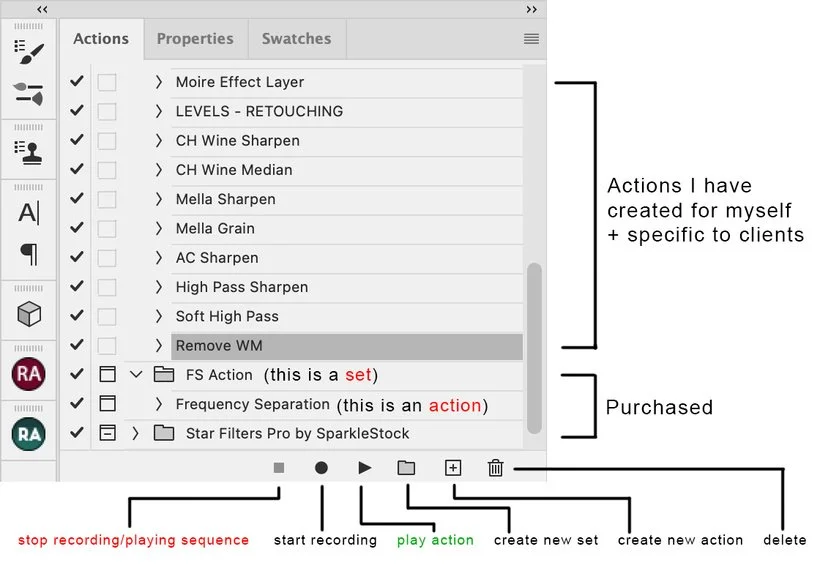
Reason #3: Photoshop actions can help you remember specific techniques and the results are always consistent. One of the things that differentiates us from other types of photographers is that we're typically creating work for a variety of brands out there and it's very likely that our work isn't going to look exactly the same project to project. It can also be tricky trying to track and remember every single little tweak or edit for each of your clients. Enter, Photoshop actions. As an example, let's say that you have a particular client that loves to have a "grainy" look to their images and you find yourself working with them quite often. You can create a specific action for this client that will add the same exact grain effect to your images so that you don't have to keep remembering the exact steps. Talk about a true lifesaver moment...
In all seriousness though, Photoshop actions are one of the best tools for product retouching. They're super easy to learn and use and you'll find yourself cutting down part of your editing time. I urge you all to pay attention the next time you're retouching and take note of any "repetitive" steps or editing tweaks you do and see if you can make it into an action. I hope that you guys enjoyed this post and please do share with us what actions you'll be creating or have already made over on Slack!
Is it the weekend yet?
Arabela